
Cognos Page Numbering

Learn how to add and customize page numbering in Cognos reports for clear navigation and professional output.

Hey folks,

If you’ve ever set up page breaking (for statements and such) then you may or may not have realized your page numbers don’t automatically reset for each new report/statement.  Cognos will page break but continue with the same page numbering unless you tell it to reset.  Let’s lock this down.

If haven’t done page sets for page breaks then just file this tip away until you need it.  If you have any questions that we can answer, contact one of our Cognos rock stars now!

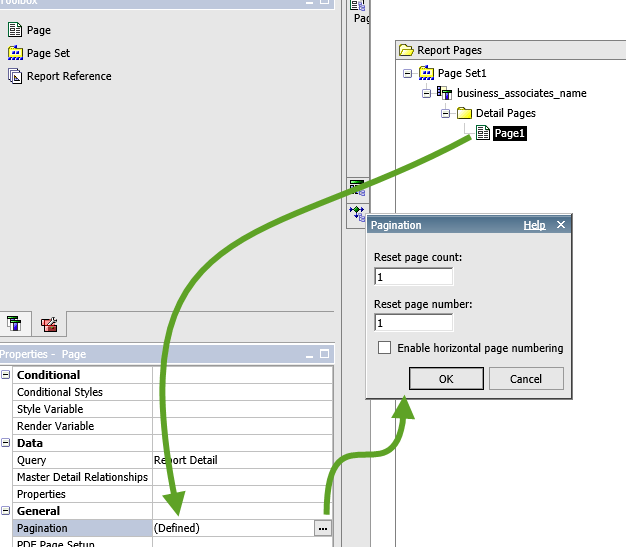
Here is how you do it:

  1. Go to Tool box in the Page Explorer
  2. Select the Page you want to reset the numbering for
  3. Go to Properties – General – Pagination
  4. Change the Reset page count to 1
  5. Change the Reset page number to 1
  6. Ok

All Posts

Alteryx
Subscribe to our newsletter

Sign up for the very best tutorials and the latest news.

* indicates required

We care about your data in our privacy policy.

Related blog posts

Business Intelligence & Analytics, Cognos BI & Analytics, Cognos Tips & Tricks
The Differences between a Cognos Dashboard and an Active Report
Compare Cognos Dashboards vs Active Reports to understand key differences in capabilities, use cases, and best scenarios for each reporting style.
Business Intelligence & Analytics, Cognos BI & Analytics, Cognos Tips & Tricks, Cognos Training
Auditing for Accurate Cognos Reports
All Cognos reports need to be checked to ensure the report produces accurate data. Follow these tips to eliminate any potential errors in your report.
Cognos BI & Analytics, Cognos Tips & Tricks, Cognos Training
Using IBM Cognos for Microsoft Office
Learn how IBM Cognos for Microsoft Office connects Cognos Analytics data to Excel, Word, and PowerPoint for dynamic, accurate reporting.

Contact Us

Interested in learning more? Contact info@capitalizeconsulting.com.