

Cognos Web Services (CWS) allows report authors to share a URL that provides direct access to report results. Traditionally, generating report results requires a user to log in to Cognos Connection, navigate through the UI to the desired report, and select prompts and run options each time new results are needed. Utilizing CWS for a report streamlines the user experience to using a URL and getting up-to-date results without the user knowing or accessing Cognos.
CWS URLs can be modified to perform several different tasks including:
- specifying filters for a report
- accessing previous versions of a report
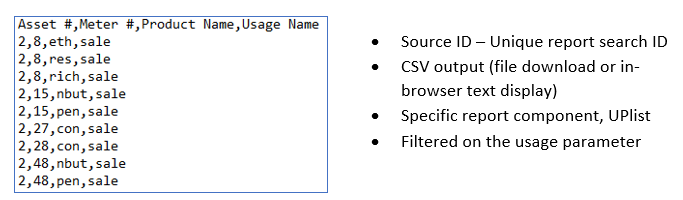
- changing the output data format
- selecting a specific subsection of the report to display
Because every parameter required to get reporting results is contained within a single URL, it is easier to interface Cognos reports with other software options like Alteryx and Pentaho. Modifying a report for use with CWS is simple and many existing reports won’t require any modification.
Implementation Example:
A company needs to automate a verification process that compares the reports of two different data software packages. They decide to outsource this process to a contractor and would like to share to-the-minute report results without the contractor needing access to the Cognos environment. Using CWS, the contractor only needs the connection address and the relevant report IDs to filter and download data for the comparison.
URL Format:
http://webservername:portnumber/ibmcognos/cgi-bin/cognos.cgi/rds/resource_type/source_type/source_id?option1=val1&option2=val2…
- webservername:portnumber: Local Cognos Connection Address
- resource_type: Type of result desired, e.g. outputFormats, promptDescriptions
- source_type: Specifies source such as path or report
- source_id: Report-specific unique identifier
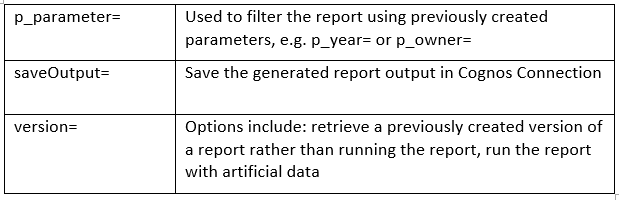
Once the source is specified, the user can alter the output with parameters like:
User credentials can be saved in-browser, specified for each URL, using a credentials prompt option.
For additional information, please contact us at marketing@capitalizeconsulting.com