

 Another great Cognos Tech Tip from one of our expert consultants. Thanks Trevor for providing this one!
You can use if then else statements in a filter as long as you have a static answer (or set of answers) to complete the filter logic, rather than using column names like you would in a calculation.
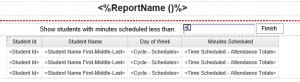 The filter in the screenshot is for a report that will show students with less than 80 minutes scheduled each day. The prompt will default to 80 unless they enter their own value in the text box prompt on the page. This is also pretty helpful because they don’t need a prompt page, they run the report at 80 and then have the option to change it if they need to. Without the if then else, they would have to answer a prompt to complete the filter logic before running the report.
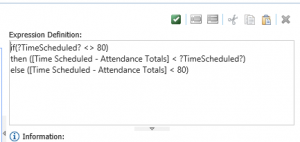 The filter was set to optional, with a default value of 80 to show in the box.