

Are you an Alteryx Server administrator? Have you ever wondered how to download information out of MongoDB? Here’s an easy way to get that information (current version is 2021.4 at time of post).
Please refer to the Help guide to access all the database schemas https://help.alteryx.com/20214/server/mongodb-schema-reference – NOTE: We do not support making direct edits to your MongoDB database. Doing so can cause unexpected results.
- Item 1
- Host / username / Password from Alteryx Settings
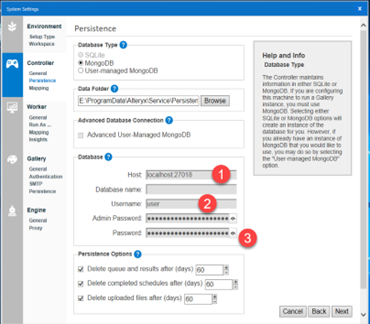
- Open Alteryx Designer
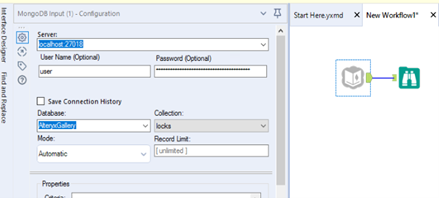
- Drag a Mongo DB input tool to the canvas
- Enter the Servername:port, username and password
- Enter the Database Name: AlteryxGallery
- Select a collection from the list you’d like to review data
- Add a Browse tool to review data
Exactly who is using our Alteryx Designer licenses?
You have users activating Alteryx Licenses, but have you ever wondered: Who is using the software?
We have a solution for you: Alteryx Designer usage data! When enabled, Alteryx collects usage data for each job run, including manual and scheduled runs. Alteryx uses this information to plan future enhancements and prioritize fixes and features. To opt out of sending your usage data to Alteryx, uncheck this option. Unchecking this option doesn’t prevent your IT department from collecting usage data. The usage data collected includes the following:
- Version of Server running the job
- Serial number of the Server installation
- Job schedule
- Job ID
- Date and time the job was run
- Errors, warnings, conversion errors, messages
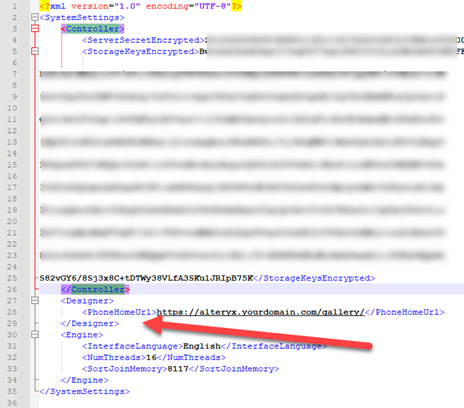
How do I enable this? To make all of this happen, update the RuntimeSettings.xml file to include the <PhoneHomeUrl> element on the Designer Computer located at C:\ProgramData\Alteryx\
Add this XML Element after your ending </Controller> xml element
<Designer>
<PhoneHomeUrl>https://{your_gallery_url}/gallery/</PhoneHomeUrl>
</Designer>
Have questions? Capitalize can help! Send your questions to alteryx@capitalizeconsulting.com and one of our Alteryx experts will reach out to help.