

Another installment of our educational blog series is here! If you have suggestions for future blog topics, we want to hear them. Email us at marketing@capitalizeconsulting.com with your ideas!
Event Studio can be used to catch changes in data values that prompt further action by your organization. For instance, last name changes require updates to email addresses. If your system doesn’t currently track these changes, you can use the steps below to generate notifications.
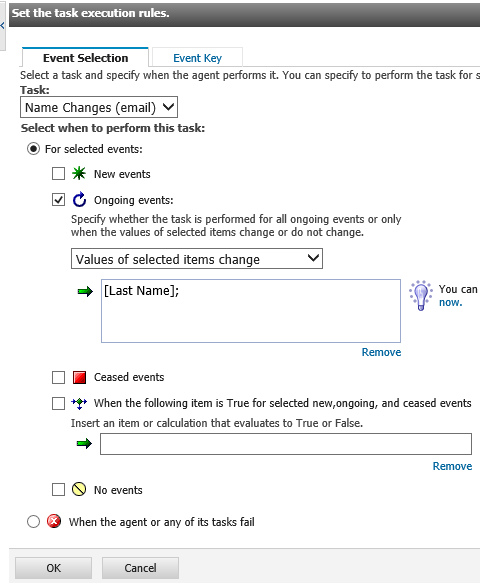
This example demonstrates capturing all values of the ‘Last Name’ field on the first run, then sending an email whenever the value changes for an employee.
This condition captures all records because the system requires the field to be completed for every employee entered.

When a change is detected, the following email message is generated and sent. More than one recipient can receive this notification. Separate the email addresses with semi-colons.

The changes are detected for unique values of the ‘Employee Number’ field (every individual.)

Since you want to be notified when a last name changes, you will check for on-going events. Every time Event Studio runs, it compares the current records for ‘last name is not null’ to the records generated from the previous run (the event list). If the employee number was in the previous list and the last name value changed, the email will be sent.
For additional information, please contact us at marketing@capitalizeconsulting.com!